3D Gaussian Splat (3DGS) is an innovative technique for reconstructing and rendering real world objects and environments. A 3DGS scene is made of millions of 3D "Gaussians" (essentially 3D ellipsoids or "splats"). In essence a 3DGS is similar to a point cloud, with each discrete point containing attributes defining the position, scale, rotation, opacity, and color of each ellipsoid.
Nira currently supports the following 3DGS file formats:
Standard Uncompressed PLY
The uncompressed PLY (Polygon File Format) file used for 3D Gaussian Splatting is the most universally compatible and the industry standard format. It is a lossless format and retains all data generated during training, it therefore allows for the best possible results. This makes it a perfect fit for Nira’s pixel streaming technology. Other file formats make compromises in order to accelerate loading in the browser. Nira doesn’t share those constraints and can render extremely large uncompressed PLY 3DGS scenes across any device.
All applications that generate 3DGS data can also export to the PLY format. For a full list of the most common tools used to create 3DGS (both free and commercial), refer to this article.
Converting your files to Uncompressed PLY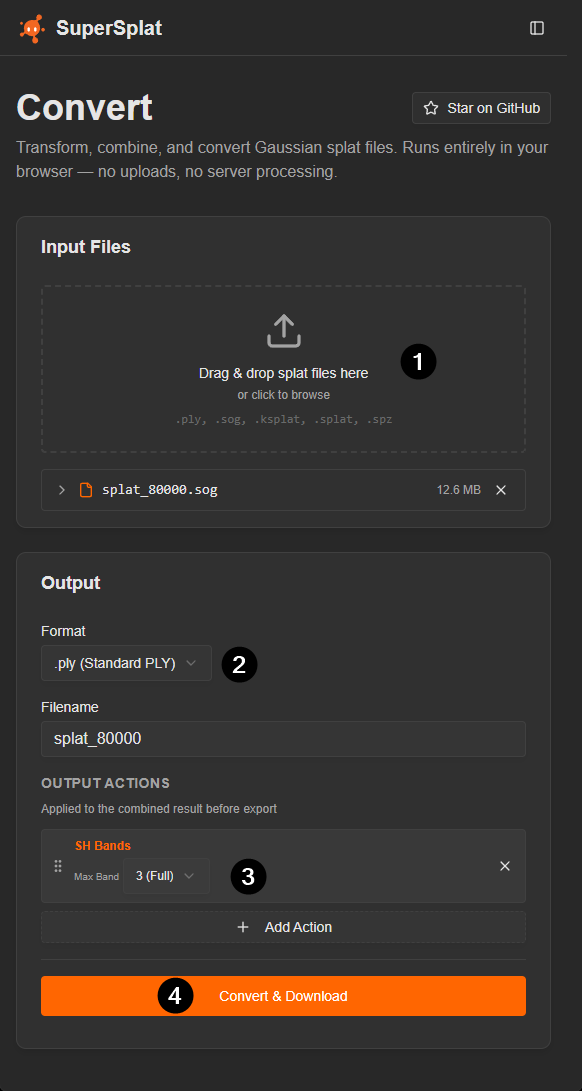
If your 3DGS file is in a different format (e.g., compressed .ply, .spz, .sog, .splat, .ksplat, .glb, .glTF, or USD) you will need to convert it to Uncompressed PLY in order to view it in Nira.
To convert your 3DGS file you can use the free SuperSpl.at Convert tool.
- Select your file or drop it in the box.
- Select Standard PLY as the output result.
- Add an optional action to the conversion such as the removal of spherical harmonics to reduce file size.
Note: This will adversely affect the rendering quality of the 3DGS scene in Nira but will result in smaller file sizes. Only recommended if reducing file size is the goal.
Click Convert and Download. The conversion is processed locally through your browser and the resulting data is saved as a download. Data is not transmitted to SuperSpl.at
Uploading 3DGS Files to Nira
3DGS is supported on all current plans (Individual, Professional, and Enterprise), however, 3DGS is not supported on legacy plans such as Core or Business (Learn more).
Uploading 3DGS .PLY files to Nira can be done by following the same steps as with any Nira upload. Simply drag and drop the file from your PC into the Nira web uploader window.
All file formats can be intermingled with 3DGS within an asset. If you’re uploading photos in addition to 3DGS and other 3D data please ensure the accompanying BlockExchange XML file is included in your upload. For additional information on how photos and models can be synchronized for viewing in Nira please see this article.
Nira Viewer Settings:
Adjust the Splat Size setting to visualize the points that make up each 3DGS.
Modify the Max Spherical Harmonic Degree setting to reveal the reflective details of each 3DGS.
Supported Plans
3DGS is supported on all current plans (Individual, Professional, and Enterprise), however, 3DGS is not supported on legacy plans such as Core or Business (Learn more).
Multiple splats
When uploading multiple .ply 3DGS files, Nira will automatically merge them into a single file during upload. It's not possible to toggle individual 3DGS files on or off, or to add additional 3DGS files to an existing asset that already contains 3DGS data.
3DGS processing software
Commercial applications: Postshot, LCC Studio, DJI Terra, Bentley iTwin, GreenValley LiDAR360, FJD Trion Model
Free, open-source apps: Lichtfeld and gsplat
Add comment
Please sign in to leave a comment.