Missing welcome or password reset emails
Stop Nira welcome, password reset and upload notification emails from landing in spam by creating a Gmail filter for @nira.app.
Written By Nira.app
Last updated 20 days ago
When you sign up for Nira, an initial welcome email will be sent to your email address. Nira will also send an email when you've forgotten your password and optionally upon certain events (e.g. An asset upload finishes). These messages can sometimes be filed into the Spam/Promotional folder by your email client, so it's often worth whitelisting emails from @nira.app to ensure you don't miss them.
Below are instructions on how to do this in Gmail by creating a filter. If you use a different mail client, it should be possible to find similar instructions for it, but if you have any difficulties please feel free to reach out to us.
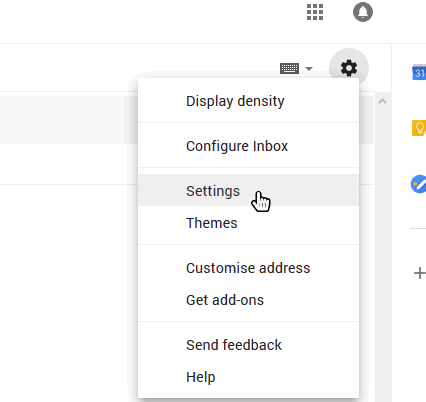
- Login to Gmail, click on the gear icon and select "Settings":
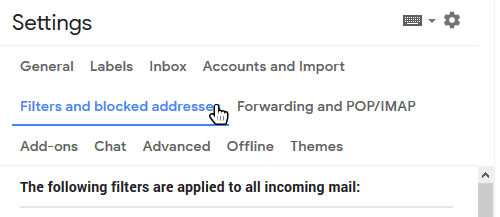
- Select "Filters and blocked addresses":
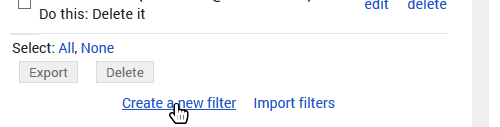
- Scroll past all your existing filters and select "Create a new filter":
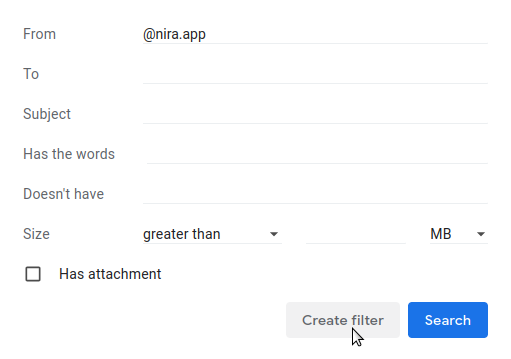
- Add "@nira.app" to the "From" field and click "Create filter":
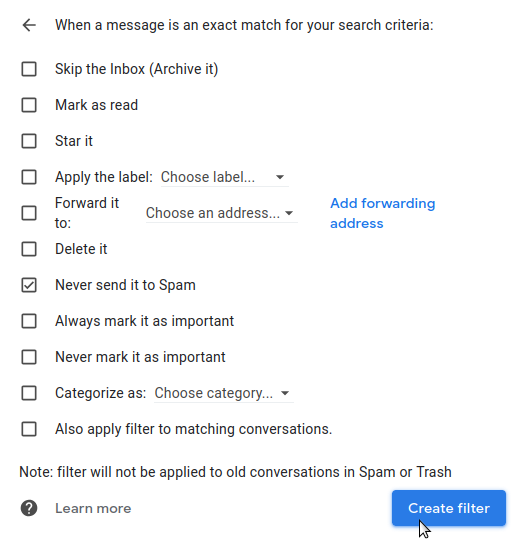
- Check the "Never send to spam" box and click "Create filter". Nira emails will now be whitelisted!
Was this helpful?
Still need help? Share an idea