Change your payment method
Add a new card or remove an old one from the Billing page, and set the new card as your default payment method.
Written By Nira.app
Last updated 20 days ago
Log into your account https://nira.app/login/.
Click on three lines icons in the top left corner (hamburger menu).
Locate the Billing option on the left sidebar and click on it.
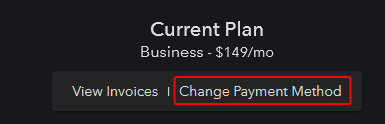
Within the Billing section, you'll find details about your current plan. Look for the option labeled "Change Payment Method." It should be visible under your current plan details. You can refer to the provided screenshot for assistance.
A new tab will open in your browser. Look for the option to "Add Payment Method."
Enter the details of your new payment method. If you want this new payment method to be your default card for all future payments, ensure the corresponding option is checked.
If you wish to remove your current payment method from your account, click the "X" button next to the card you'd like to remove.
Was this helpful?
Still need help? Share an idea